
Import & Export
VirtuProbe can export probes and entire bundles to JSON files, and import them back. This lets you share configurations between instances, commit them to version control, or add them to a Library collection.
All of these live in the Project Explorer. Open a row’s ⋯ menu, or use the + menu in the Explorer header.
Exporting
Section titled “Exporting”Export a probe
Section titled “Export a probe”Open the probe’s ⋯ menu in the Explorer and choose Export, and pick where to save the .json file.
Export a bundle
Section titled “Export a bundle”Open the bundle’s ⋯ menu and choose Export, and pick where to save the .json file. It contains the bundle name and all its probes.
Importing
Section titled “Importing”Import a probe
Section titled “Import a probe”Open a bundle’s ⋯ menu, choose Import Probe from JSON, and select a probe .json file. The probe is created inside that bundle.
Import a bundle
Section titled “Import a bundle”Use the + menu in the Explorer header, choose Import Bundle from JSON, and select a bundle .json file. A new bundle is created with all the probes from the file.
Import from the Library
Section titled “Import from the Library”See Library. The Library import uses the same underlying format.
Import an API definition or request collection
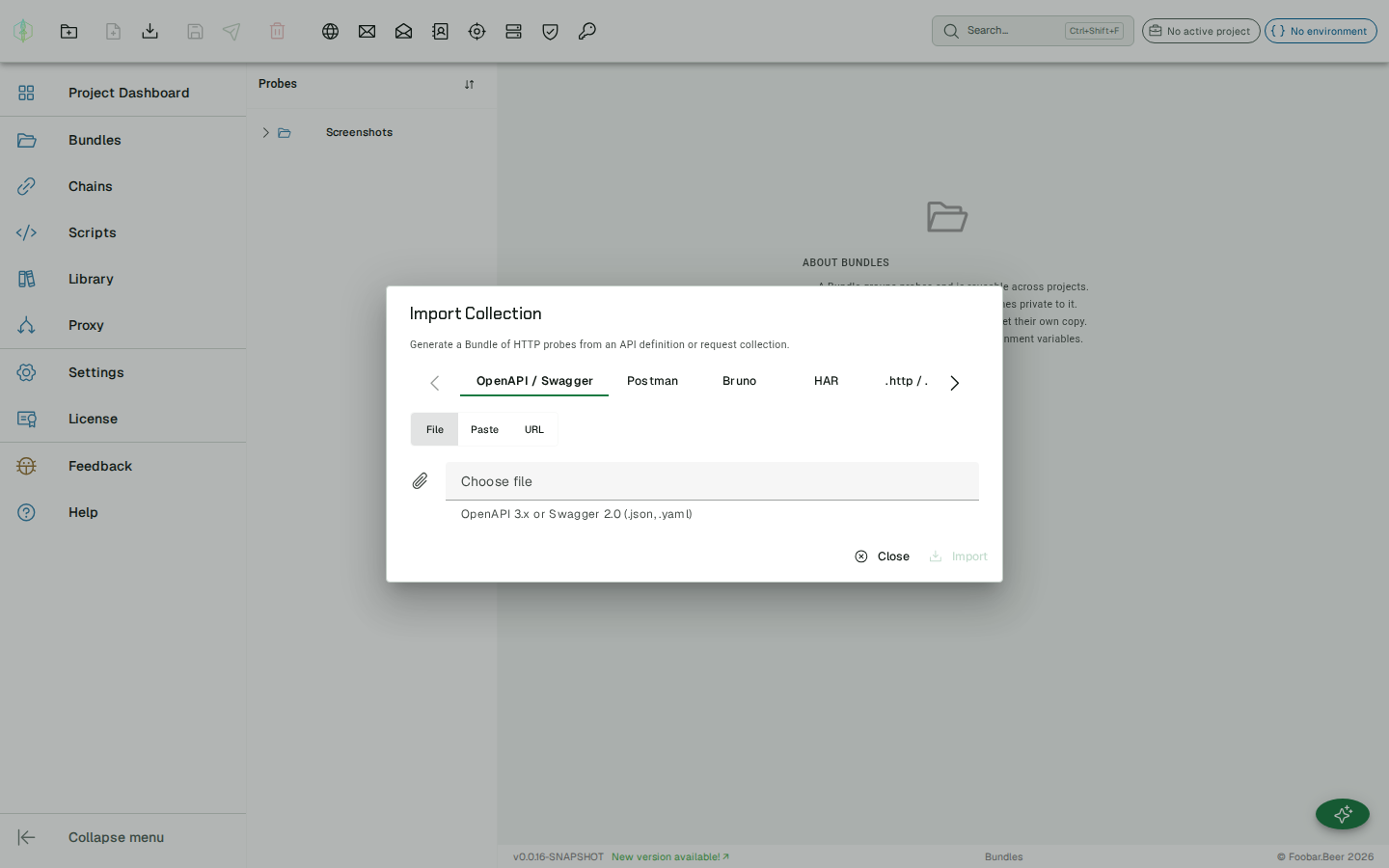
Section titled “Import an API definition or request collection”Already have your endpoints defined elsewhere? Bring them straight in. In the Bundles view, click Import Collection in the action toolbar and pick a format:
| Format | Accepts | Result |
|---|---|---|
| OpenAPI / Swagger | OpenAPI 3.x or Swagger 2.0, JSON or YAML, as a file, pasted text or a URL | One HTTP probe per operation, grouped into sub-bundles by tag |
| Postman | Postman collection v2.1 export (.json), as a file or pasted text | Requests become probes; folders become sub-bundles |
| Bruno | A single .bru request, or a .zip of the collection folder | The folder layout maps onto the bundle tree |
| HAR | An HTTP Archive (.har), as a file or pasted text | One probe per recorded request (identical requests de-duplicated) |
.http / .rest | A request file using ### separators, as a file or pasted text | One probe per request |
| Insomnia | An Insomnia v4 export (.json), as a file or pasted text | Requests become probes; folders become sub-bundles |
What gets mapped:
- Method, URL, query/header parameters, and request body populate the probe. Path parameters and existing
{{variables}}are preserved as placeholders; for OpenAPI the server URL is surfaced as{{baseUrl}}(define it in your environment). - Folders / tags become a nested bundle tree.
- Authentication: Bearer, Basic, and API-key (header or query) schemes are mapped onto request headers/parameters. OAuth2 is not mapped yet; add the token header manually after import.
The import always creates a new bundle and never overwrites an existing one. A malformed document is reported with a clear error and nothing is created.
File format
Section titled “File format”All exported files use the same JSON structure. The type field distinguishes probes from bundles.
Probe file
Section titled “Probe file”{ "vpVersion": 1, "type": "probe", "protocol": "HTTP", "name": "My probe", "description": "Optional description", "tags": ["http", "rest"], "data": { }}| Field | Type | Description |
|---|---|---|
vpVersion | integer | Always 1 |
type | string | "probe" |
protocol | string | "HTTP", "SMTP", "IMAP", "LDAP", "DNS", "SPAMD", "SMB", "KERBEROS", "MYSQL", "MONGO", "POSTGRES", "REDIS", "MSSQL", "FTP", "STOMP", "FREESTYLE" |
name | string | Probe display name |
description | string | null | Optional description |
tags | string[] | Tag list, may be empty |
data | object | Protocol-specific payload, see below |
Bundle file
Section titled “Bundle file”{ "vpVersion": 1, "type": "bundle", "name": "My bundle", "probes": [ { "vpVersion": 1, "type": "probe", "protocol": "HTTP", ... } ]}Chain file
Section titled “Chain file”{ "vpVersion": 1, "type": "chain", "name": "My chain", "description": "Optional description", "tags": ["http", "chain"], "data": { "name": "My chain", "steps": [ ] }}The data.steps array uses the same structure as the chain editor. See the chain steps reference.
Protocol data payloads
Section titled “Protocol data payloads”A worked example follows for every protocol. The data object is what an export writes and what an
import reads, so an exported probe doubles as a template for one you write by hand.
{ "method": "GET", "url": "https://example.com/api/resource", "params": [ { "enabled": true, "name": "key", "value": "val", "description": "" } ], "headers": [ { "enabled": true, "name": "Accept", "value": "application/json", "description": "" } ], "cookies": [], "body": null}method is one of GET, POST, PUT, PATCH, DELETE, HEAD, OPTIONS.
body is a string or null. params, headers, cookies are arrays that may be empty.
{ "host": "localhost", "port": 1025, "ssl": false, "commands": [ { "enabled": true, "commandType": "EHLO", "data": "localhost", "expectedCode": 250 }, { "enabled": true, "commandType": "MAIL_FROM", "data": "sender@example.com","expectedCode": 250 }, { "enabled": true, "commandType": "RCPT_TO", "data": "to@example.com", "expectedCode": 250 }, { "enabled": true, "commandType": "DATA", "data": null, "expectedCode": 354 }, { "enabled": true, "commandType": "DATA_BODY", "data": "Subject: Hi\r\n\r\nBody text.", "expectedCode": null }, { "enabled": true, "commandType": "QUIT", "data": null, "expectedCode": 221 } ]}Valid commandType values: EHLO, HELO, MAIL_FROM, RCPT_TO, DATA, DATA_BODY, QUIT, RSET, NOOP, VRFY, STARTTLS, AUTH, CUSTOM.
expectedCode is an integer assertion or null to skip. DATA_BODY sends the dot-stuffed message body; STARTTLS upgrades the connection.
{ "host": "localhost", "port": 3143, "ssl": false, "commands": [ { "enabled": true, "commandType": "LOGIN", "data": "username password", "expectedStatus": "OK" }, { "enabled": true, "commandType": "SELECT", "data": "INBOX", "expectedStatus": "OK" }, { "enabled": true, "commandType": "FETCH", "data": "1 (ENVELOPE)", "expectedStatus": "OK" }, { "enabled": true, "commandType": "LOGOUT", "data": null, "expectedStatus": "OK" } ]}Valid commandType values: CAPABILITY, NOOP, LOGOUT, STARTTLS, LOGIN, AUTHENTICATE, SELECT, EXAMINE, CREATE, DELETE, RENAME, SUBSCRIBE, UNSUBSCRIBE, LIST, LSUB, STATUS, APPEND, CHECK, CLOSE, EXPUNGE, SEARCH, FETCH, STORE, COPY, MOVE, UID, CUSTOM.
expectedStatus is "OK", "NO", "BAD", or null to skip.
{ "host": "localhost", "port": 389, "ssl": false, "commands": [ { "enabled": true, "commandType": "BIND", "dn": "cn=admin,dc=example,dc=com", "password": "secret", "expectedResultCode": 0 }, { "enabled": true, "commandType": "SEARCH", "dn": "dc=example,dc=com", "filter": "(objectClass=inetOrgPerson)", "scope": "SUB", "attributes": "cn mail", "sizeLimit": 0, "timeLimit": 0, "expectedResultCode": 0 }, { "enabled": true, "commandType": "UNBIND", "expectedResultCode": null } ]}Valid commandType values: BIND, SEARCH, UNBIND, DELETE, COMPARE.
scope is BASE, ONE, or SUB. attributes is a space-separated list; empty returns all.
expectedResultCode is an integer LDAP result code or null. Common codes: 0 success, 6 compareTrue, 49 invalidCredentials.
{ "host": "8.8.8.8", "port": 53, "udp": true, "queries": [ { "enabled": true, "name": "example.com", "type": "A", "recursionDesired": true, "expectedRcode": null } ]}Valid type values: A, AAAA, MX, CNAME, TXT, NS, PTR, SOA.
expectedRcode is an integer RCODE or null to skip. Common values: 0 NOERROR, 3 NXDOMAIN.
udp: true uses UDP (with automatic TCP retry on truncation); false forces TCP.
SpamAssassin (SPAMD)
Section titled “SpamAssassin (SPAMD)”{ "host": "localhost", "port": 783, "command": "CHECK", "version": "1.5", "body": "From: user@example.com\r\nSubject: Hello\r\n\r\nMessage body."}Valid command values: PING, CHECK, SYMBOLS, REPORT, REPORT_IFSPAM, SKIP, PROCESS.
{ "host": "10.0.0.1", "port": 445, "dialect": "SMB2", "authType": "NTLM", "domain": "WORKGROUP", "username": "smbuser", "password": "Password123!", "ntHash": "", "signing": false, "encryption": false, "commands": [ { "enabled": true, "commandType": "NEGOTIATE", "expectedStatus": null }, { "enabled": true, "commandType": "SESSION_SETUP", "expectedStatus": null }, { "enabled": true, "commandType": "TREE_CONNECT", "sharePath": "private", "expectedStatus": null }, { "enabled": true, "commandType": "LIST_SHARES", "expectedStatus": null }, { "enabled": true, "commandType": "TREE_DISCONNECT","expectedStatus": null }, { "enabled": true, "commandType": "LOGOFF", "expectedStatus": null } ]}dialect is "SMB2" (default) or "SMB1". authType is "NONE", "NTLM", or "PTH" (pass-the-hash). For PTH, set ntHash to the 32-character hex NT hash and leave password empty.
Valid commandType values: NEGOTIATE, SESSION_SETUP, TREE_CONNECT, TREE_DISCONNECT, LOGOFF, ECHO, FILE_READ, FILE_WRITE, FILE_DELETE, FILE_RENAME, DIR_LIST, DIR_LIST_RECURSIVE, DIR_CREATE, DIR_REMOVE, LIST_SHARES, ACL_READ, ACL_WRITE, PIPE_OPEN, DCERPC_BIND, LSARPC_QUERY_INFO_POLICY, SAMR_ENUM_USERS, SAMR_DOMAIN_USERS, SAMR_DOMAIN_GROUPS, SAMR_RID_CYCLE, SRVSVC_NETSERVERGETINFO, SRVSVC_NETSESSIONENUM, SRVSVC_NETSHAREGETINFO, WKSSVC_NETWKSTAUSERENUM, EFSRPC_OPEN_FILE_RAW, SPOOLSS_RPC_REMOTE_FIND_FIRST_PRINTER_CHANGE_NOTIFICATION, DFSNM_NETR_DFS_ADD_STD_ROOT, FSRVP_IS_PATH_SUPPORTED.
The commands from PIPE_OPEN onwards drive named pipes and MSRPC, and they read fields of their own. PIPE_OPEN takes pipeName, such as srvsvc with no leading backslash. DCERPC_BIND takes interfaceUuid and interfaceVersion, which defaults to 1.0. LSARPC_QUERY_INFO_POLICY takes policyClass. SAMR_RID_CYCLE takes ridStart and ridEnd, defaulting to 500 and 1500. SRVSVC_NETSERVERGETINFO, SRVSVC_NETSESSIONENUM, SRVSVC_NETSHAREGETINFO and WKSSVC_NETWKSTAUSERENUM take infoLevel, defaulting to 102 for the first and 1 for the rest, and SRVSVC_NETSHAREGETINFO names the share in sharePath. EFSRPC_OPEN_FILE_RAW and FSRVP_IS_PATH_SUPPORTED take uncPath. All of them run over an open session, so they follow NEGOTIATE and SESSION_SETUP in the list. Anonymous setup is enough for some of them and not for others, which is a property of the server rather than of the file.
expectedStatus is an NT status code integer (e.g. 0 for STATUS_SUCCESS) or null to skip the assertion. File operations use filePath or dirPath; FILE_WRITE also uses fileContent; FILE_RENAME uses newPath.
Kerberos
Section titled “Kerberos”{ "host": "dc01.lab.local", "port": 88, "realm": "LAB.LOCAL", "username": "svc_iis", "password": "Service1xX!", "requestType": "KERBEROAST", "spn": "HTTP/web.lab.local", "udp": true}Valid requestType values: AS_REQ, AS_REP_ROAST, KERBEROAST.
realm is the Kerberos realm in uppercase. Each operation reads the fields it needs: AS_REQ validates username and password; AS_REP_ROAST needs only username and leaves password empty; KERBEROAST needs both plus the spn to request a ticket for.
udp: true sends over UDP and falls back to TCP when the reply is truncated; false forces TCP.
{ "host": "db.example.com", "port": 3306, "database": "shop", "authCredentialId": "", "sslMode": "DISABLED", "allowPublicKeyRetrieval": false, "allowCleartext": false, "query": "SELECT id, email FROM users WHERE active = 1 ORDER BY id", "extraProps": {}}Valid sslMode values: DISABLED, REQUIRED, VERIFY_CA, VERIFY_IDENTITY. The editor labels this field TLS mode, and the key in the file is sslMode.
authCredentialId names an entry in the credential store, so no username or password is written to the file. Leave it empty and the probe carries no credential of its own, in which case the project’s default credential applies.
allowPublicKeyRetrieval covers caching_sha2_password over a connection with no TLS, and allowCleartext permits mysql_clear_password. Both are off by default.
extraProps is a map of extra driver connection properties, merged after the fields above so it wins on a collision. The probe editor has no field for it, so it is set by editing the file.
MongoDB
Section titled “MongoDB”{ "host": "localhost", "port": 27017, "database": "shop", "authCredentialId": "", "authSource": "admin", "tlsMode": "DISABLED", "connectionString": "", "queryMode": "FORM", "shellQuery": "", "operationType": "FIND", "collection": "users", "filter": "{\"active\": true}", "document": "", "update": "", "pipeline": "", "command": "", "projection": "{\"_id\": 0, \"email\": 1}", "limit": 20}Valid operationType values: FIND, INSERT, UPDATE, DELETE, AGGREGATE, COUNT, RUN_COMMAND, LIST_COLLECTIONS. Each one reads only the fields it needs: filter and projection and limit for FIND, document for INSERT, filter and update for UPDATE, filter for DELETE and COUNT, pipeline for AGGREGATE, command for RUN_COMMAND, and nothing beyond the database for LIST_COLLECTIONS. The JSON bodies are held as strings.
queryMode is FORM or SHELL. In SHELL, shellQuery carries a full mongosh line such as db.users.find({active:true}).sort({name:-1}).limit(20) and the structured fields above are not read.
Valid tlsMode values: DISABLED, REQUIRED, VERIFY_FULL.
connectionString takes a full mongodb:// or mongodb+srv:// URI and overrides host, port, authentication and TLS when it is set.
authSource is the authentication database for the credential, admin by default. authCredentialId works the same way as it does for MySQL. A limit of 0 returns everything.
PostgreSQL
Section titled “PostgreSQL”{ "host": "localhost", "port": 5432, "database": "shop", "authCredentialId": "", "sslMode": "DISABLED", "query": "SELECT table_name FROM information_schema.tables WHERE table_schema = 'public'", "extraProps": {}}Valid sslMode values: DISABLED, REQUIRED, VERIFY_CA, VERIFY_IDENTITY, labeled TLS mode in the editor as they are for MySQL. VERIFY_CA and VERIFY_IDENTITY need a root certificate available to the driver.
There is no allowPublicKeyRetrieval or allowCleartext here, because PostgreSQL authenticates with SCRAM-SHA-256 over a plain connection.
authCredentialId and extraProps behave as they do for MySQL.
A Redis probe runs in Action mode (one high-level action) or Advanced mode (an ordered command list). A blank actionType selects Advanced mode and reads the commands array; any other value runs that action and expands into the real commands underneath, so the history shows the exchanges either way.
{ "host": "localhost", "port": 6379, "tlsMode": "DISABLED", "insecureTls": false, "database": 0, "authCredentialId": "", "actionType": "GET_VALUE", "key": "session:abc123", "returnMode": "VALUE", "value": "", "ttlSeconds": 0, "infoSection": "", "infoField": "", "keyPattern": "", "scanLimit": 100, "commands": []}Valid actionType values: PING, GET_VALUE, SET_VALUE, SERVER_INFO, FIND_KEYS, or blank for Advanced mode. Each one reads only the fields it needs: key and returnMode for GET_VALUE, key with value and ttlSeconds for SET_VALUE, infoSection and infoField for SERVER_INFO, keyPattern and scanLimit for FIND_KEYS, and nothing beyond the connection for PING.
returnMode applies to GET_VALUE and is VALUE, EXISTS, TTL, or TYPE; blank means VALUE. ttlSeconds of 0 sets no expiry. database is the index a SELECT switches to, and 0 is Redis’s default, which sends no SELECT.
Valid tlsMode values: DISABLED, REQUIRED, VERIFY_FULL. The editor labels this field TLS mode, and insecureTls trusts a self-signed or private-CA certificate when TLS is on.
authCredentialId names an entry in the credential store, so the password never touches the file; it behaves as it does for MySQL.
In Advanced mode, each entry of commands is { "enabled": true, "command": "GET", "args": "session:abc123", "expectedReply": "" }. An entry with no enabled key is sent.
SQL Server
Section titled “SQL Server”A SQL Server probe runs a T-SQL batch, or calls a stored procedure with bound parameters. Its protocol is "MSSQL", which the editor and sidebar present as SQL Server.
{ "host": "db.example.com", "port": 1433, "database": "shop", "instanceName": "", "authCredentialId": "", "sslMode": "DISABLED", "query": "EXEC dbo.GetOrderTotal @orderId = ?, @total = ? OUTPUT", "maxRows": 1000, "parameters": [ { "enabled": true, "label": "orderId", "mode": "IN", "sqlType": "INTEGER", "value": "42" }, { "enabled": true, "label": "total", "mode": "OUT", "sqlType": "DECIMAL", "value": "" } ], "extraProps": {}}Valid sslMode values: DISABLED, REQUIRED, VERIFY_CA, VERIFY_IDENTITY, labeled TLS mode in the editor and keyed sslMode as they are for MySQL and PostgreSQL.
instanceName is the one field with no MySQL or PostgreSQL counterpart. A named instance such as SQLEXPRESS is resolved through the SQL Browser on UDP 1434 instead of the TCP port, so getting it wrong presents as a network problem; leave it blank for the default instance on port.
maxRows caps a returned result set and defaults to 1000; 0 means no limit. An absent maxRows takes the default rather than 0.
parameters is empty for a plain statement, in which case the probe runs a direct execute rather than a procedure call. Each entry is { enabled, label, mode, sqlType, value }: mode is IN, OUT, or INOUT and defaults to IN; sqlType is a java.sql.Types name such as INTEGER or DECIMAL, defaulting to VARCHAR; value is read for IN and INOUT and ignored for OUT; a blank label falls back to the parameter’s 1-based position. An entry with no enabled key is sent.
authCredentialId and extraProps behave as they do for MySQL.
An FTP probe runs in Action mode or Advanced mode, the same split as Redis. A blank actionType reads the commands array; any other value runs that action.
{ "host": "localhost", "port": 21, "tlsMode": "NONE", "insecureTls": false, "authCredentialId": "", "passiveMode": "EPSV", "transferType": "BINARY", "actionType": "LIST_DIR", "remotePath": "/pub", "uploadContent": "", "commands": []}Valid actionType values: LIST_DIR, DOWNLOAD_FILE, UPLOAD_FILE, FILE_INFO, or blank for Advanced mode. remotePath is the directory for LIST_DIR and the file for the other three; uploadContent is the text stored by UPLOAD_FILE.
Valid tlsMode values: NONE, EXPLICIT, IMPLICIT. insecureTls trusts a self-signed or private-CA certificate when TLS is on.
passiveMode is EPSV (default) or PASV; both are passive, and active mode is not supported. transferType is BINARY (default) or ASCII, the TYPE used for data transfers.
authCredentialId names a credential store entry sent as the USER and PASS login.
In Advanced mode, each entry of commands is { "enabled": true, "command": "RETR file.txt", "expectedCode": 226, "uploadContent": "" }, where command is a raw FTP command line, expectedCode asserts the reply code (null passes on any 1xx/2xx/3xx), and uploadContent carries the bytes for a STOR, STOU, or APPE. An entry with no enabled key is sent.
ActiveMQ (STOMP)
Section titled “ActiveMQ (STOMP)”An ActiveMQ probe speaks STOMP, so its protocol is "STOMP" while the editor and sidebar present it as ActiveMQ. It runs in Action mode or Advanced mode (an ordered frames list).
{ "host": "localhost", "port": 61613, "tlsMode": "NONE", "insecureTls": false, "authCredentialId": "", "virtualHost": "", "heartBeat": "0,0", "actionType": "SEND", "destination": "/queue/orders", "replyDestination": "", "body": "{\"orderId\": 42}", "contentType": "application/json", "headers": [ { "name": "priority", "value": "4" } ], "messageCount": 1, "waitMs": 5000, "ackMode": "auto", "frames": []}Valid actionType values: CONNECT, SEND, RECEIVE, SEND_RECEIVE, or blank for Advanced mode. destination is the queue or topic. SEND reads body, contentType, and the extra headers; RECEIVE and SEND_RECEIVE read messageCount (default 1), waitMs (default 5000), and ackMode; SEND_RECEIVE also reads replyDestination, sent as the reply-to header.
Valid tlsMode values: NONE or TLS. insecureTls trusts a self-signed or private-CA certificate when TLS is on. Valid ackMode values: auto (default) or client-individual.
virtualHost is the CONNECT host header and defaults to the probe’s host when blank. heartBeat is the STOMP heart-beat pair, "0,0" for none.
authCredentialId names a credential store entry, sent as the login and passcode on CONNECT.
Each headers entry is { name, value }. In Advanced mode, each entry of frames is { enabled, command, headers, body, waitFor, count, timeoutMs }, where command is a STOMP frame verb such as SEND or SUBSCRIBE. A frame with no enabled key is sent.
Freestyle
Section titled “Freestyle”A Freestyle probe is an ordered list of exchanges run down one connection, so data carries connection settings and an exchanges array rather than a single request.
{ "host": "localhost", "port": 8006, "transport": "TCP", "tls": false, "tlsInsecure": false, "connectTimeoutMs": null, "readTimeoutMs": 3000, "exchanges": [ { "enabled": true, "label": "banner", "payloadMode": "TEXT", "payload": "", "receiveOnly": true, "read": { "type": "DELIMITER", "delimiter": "\\r\\n", "delimiterMode": "TEXT" }, "expectContains": "220 ", "expectOutcome": "OK" }, { "enabled": true, "label": "greet", "payloadMode": "TEXT", "payload": "EHLO probe\\r\\n", "receiveOnly": false, "read": { "type": "IDLE", "idleMs": 300 }, "expectOutcome": "OK" } ]}transport is TCP or UDP. tls applies to TCP; tlsInsecure skips certificate validation.
connectTimeoutMs and readTimeoutMs are null to use the timeouts configured for the installation.
Within an exchange:
payloadModeisTEXT,HEXorBASE64, andTEXTunderstands the escapes\r\n\t\0\\and\xNN. That is why the payloads above are written\\r\\nin JSON: the file carries the two-character escape, and the probe turns it into a carriage return and a line feed.receiveOnly: truereads without sending, which is what a banner needs. An exchange with noenabledkey is sent.read.typeisNONE,IDLE,DELIMITER,COUNTorLENGTH_PREFIX, and each reads its own settings:idleMsforIDLE,delimiterwithdelimiterModeforDELIMITER,byteCountforCOUNT, andprefixByteswithbigEndianandprefixCountsItselfforLENGTH_PREFIX.maxBytescaps any of them. An absentreadreads asIDLE.expectContainsasserts the reply carries those bytes, authored in the exchange’s ownpayloadMode.expectOutcomeasserts how the exchange ended, one ofOK,EOF,RST,TIMEOUT,PARTIAL,CONNECT_REFUSED,CONNECT_TIMEOUTorRESOLVE_FAILED.
See the Freestyle probe page for what each read strategy and outcome means in practice.
Variable placeholders
Section titled “Variable placeholders”All string fields in data support {{variableName}} placeholders. At send time, placeholders are resolved from the active project environment. In chain steps, they are also resolved from the chain variable context produced by upstream extractors.