
SMB probe
The SMB probe sends a configurable sequence of SMB commands to a target server. VirtuProbe implements the SMB protocol from scratch (MS-SMB2, MS-NLMP, SPNEGO/ASN.1). No third-party SMB library is used, which gives full control over every byte of the exchange.
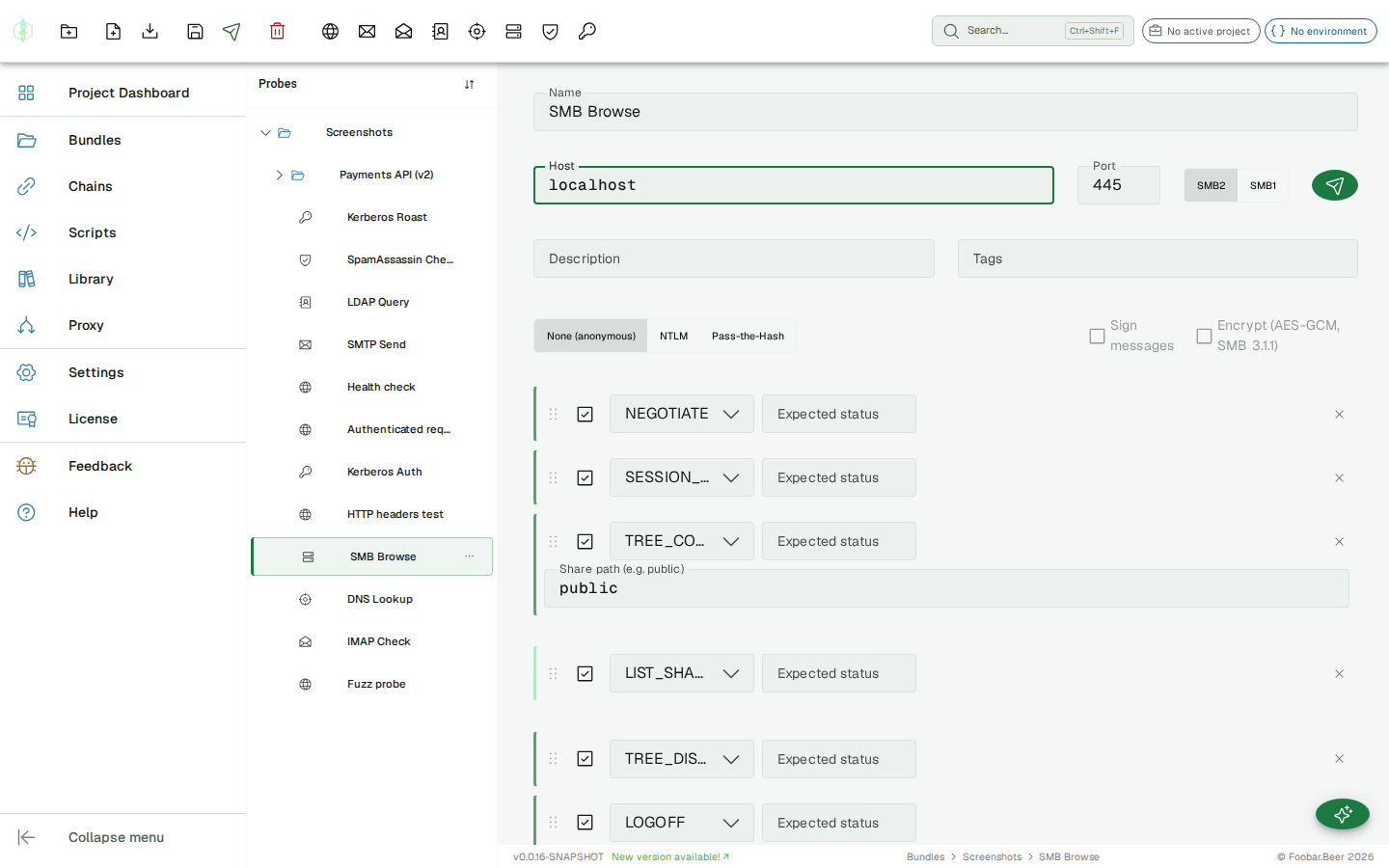
Connection settings
Section titled “Connection settings”| Field | Description |
|---|---|
| Host | Target hostname or IP |
| Port | Server port (default: 445) |
| Dialect | SMB2 (default, supports SMB 2.0.2 through 3.0.2) or SMB1 (CIFS/NT LM 0.12, legacy targets) |
Authentication
Section titled “Authentication”| Type | Description |
|---|---|
| None | Anonymous / null session, no credentials sent |
| NTLM | NTLMv2 with domain, username, and password |
| Pass-the-Hash | NTLMv2 using the NT hash directly (no plaintext password required) |
For PTH, provide the 32-character hex NT hash, which is the MD4 hash of the UTF-16LE password, extractable from LSASS or NTDS.dit.
SMB3 transport options
Section titled “SMB3 transport options”| Option | Description |
|---|---|
| Sign messages | Enables AES-128-CMAC message signing after SESSION_SETUP (requires NTLM or PTH auth) |
| Encrypt (AES-GCM) | Wraps all messages in SMB2 TRANSFORM_HEADER with AES-128-GCM encryption (SMB 3.1.1, requires auth) |
Command sequence
Section titled “Command sequence”SMB is stateful: commands are sent in order and the session state carries across them. Commands are reorderable by dragging.
Session commands
Section titled “Session commands”| Command | Description |
|---|---|
NEGOTIATE | Opens the connection and negotiates the dialect. Always the first command. |
SESSION_SETUP | Authenticates using the configured auth type. Two-round NTLM exchange is handled automatically. |
TREE_CONNECT | Connects to a share (e.g. public, C$, IPC$). Enter the share name and the UNC path is built from the probe host. |
TREE_DISCONNECT | Disconnects from the current share. |
LOGOFF | Terminates the session on the server. |
ECHO | Keepalive / connection health check. No auth required. |
File and directory operations
Section titled “File and directory operations”| Command | Description |
|---|---|
FILE_READ | Opens a file path and reads its content. Text files render inline; binary files as base64. |
FILE_WRITE | Creates or overwrites a file with the provided content. |
FILE_DELETE | Deletes a file. |
FILE_RENAME | Renames or moves a file. Takes the current path and the new path. |
DIR_LIST | Lists a directory path and returns filenames, sizes, timestamps and directory flags. An empty path lists the share root. |
DIR_LIST_RECURSIVE | The same listing carried down through subdirectories, to a Max depth you set. The Filename patterns field narrows it to globs such as *.kdbx, id_rsa or password*, which is how you sweep a share for interesting files instead of reading listings by hand. Leave the patterns empty to get every entry. |
DIR_CREATE | Creates a directory. |
DIR_REMOVE | Removes an empty directory. |
LIST_SHARES | Enumerates all shares via the SRVSVC named pipe over IPC$. Returns name, type, and comment for each share. It opens the pipe itself, so it needs no TREE_CONNECT before it. |
ACL_READ | Reads the security descriptor of a file or directory and shows the owner, the group and the access control entries. With no path set it reads the share root. |
ACL_WRITE | Writes a DACL onto a file. Both the file path and the descriptor are required, and the descriptor is entered as base64 bytes. |
Named pipes and DCE/RPC
Section titled “Named pipes and DCE/RPC”| Command | Description |
|---|---|
PIPE_OPEN | Opens a named pipe on the connected tree, such as srvsvc, lsarpc or samr. Write the name with no leading backslash. |
PIPE_LIST | Tries a list of named pipes on IPC$ and reports which answer. A pipe that opens is a service that is listening, so the set of reachable pipes fingerprints the roles the host runs. Leave Pipe names empty for a broad default sweep, or name your own. |
DCERPC_BIND | Binds an interface on the open pipe. Takes the interface UUID and a version, which defaults to 1.0. |
Every command in the two groups below opens and binds its own pipe for you. Reach for these two when you want to drive an interface VirtuProbe has no dedicated command for, or to watch a bind succeed or fail as a step of its own.
Domain and host enumeration
Section titled “Domain and host enumeration”| Command | Description |
|---|---|
LSARPC_QUERY_INFO_POLICY | Asks the local security authority for the domain name and its SID. Policy info class chooses which domain: PolicyAccountDomainInformation, the default, also accepted as 5, or PolicyPrimaryDomainInformation, also accepted as 3. The SID it returns is what a RID sweep needs. |
SAMR_ENUM_USERS | Enumerates the domain’s user accounts, one line each as username (RID n). |
SAMR_DOMAIN_USERS | An alias of SAMR_ENUM_USERS, so a probe written against either name runs. |
SAMR_DOMAIN_GROUPS | Enumerates the domain’s groups. |
SAMR_RID_CYCLE | Resolves a range of RIDs to account names, sweeping RID start to RID end. It defaults to 500 through 1500: 500 is the built-in Administrator and created accounts begin at 1000, so a sweep starting above 500 misses both ends of what you usually want. An end below the start is refused rather than swept backwards. |
SRVSVC_NETSERVERGETINFO | Server information: name, version, type and comment. Info level defaults to 102. |
SRVSVC_NETSESSIONENUM | The sessions currently open on the server, which is who is connected and from where. Info level defaults to 1. |
SRVSVC_NETSHAREGETINFO | Detail for a single share, named in Share path. Info level defaults to 1. |
WKSSVC_NETWKSTAUSERENUM | The user accounts logged on to the machine. Info level defaults to 1. |
How much of this a server hands over depends on what it will tell the session you are on, and that difference is usually the finding: some answer a null session, some want credentials, some refuse either way. A server that does not implement a procedure at all is reported in those words, as the procedure number being out of range, so a gap on their side does not read as a broken request on yours.
Authentication coercion
Section titled “Authentication coercion”| Command | Description |
|---|---|
EFSRPC_OPEN_FILE_RAW | Asks the encrypting file system service to open a file at the UNC path you name. Known as PetitPotam. |
SPOOLSS_RPC_REMOTE_FIND_FIRST_PRINTER_CHANGE_NOTIFICATION | Asks the print spooler to send change notifications to the Listener UNC you name. Known as PrinterBug. |
DFSNM_NETR_DFS_ADD_STD_ROOT | Asks the distributed file system service to add a namespace root, named in Share path. Known as DFSCoerce. |
FSRVP_IS_PATH_SUPPORTED | Asks the shadow copy agent whether it supports the UNC path you name. Known as ShadowCoerce. |
These four ask the target to reach out to a path you choose, which is how you test whether a host can be made to authenticate somewhere it should not. Read their result carefully: they report success when the call reached the server, not when it came back STATUS_SUCCESS. A refused call still arrived, and arriving is what you were testing. Whether the target then authenticated to your path is not visible in the response at all, and is observed at the listener you pointed it at.
Impact and vulnerability checks
Section titled “Impact and vulnerability checks”| Command | Description |
|---|---|
DRSUAPI_PROBE_REPLICATION_RIGHTS | Tests whether the account holds the directory-replication right that a DCSync uses. It opens a sealed replication session to the domain controller and asks to replicate one object: an account with the right is served, one without it is refused with an access error. It decrypts nothing, so it answers “can this account DCSync” without pulling a single secret. Name the account of interest in Target account (informational). |
DRSUAPI_DCSYNC_DUMP | A real DCSync. It replicates one account from the domain controller and decrypts its password to the NT hash, the way domain replication does. Name the account to replicate in Target account, which suggests krbtgt. It needs an authenticated session, NTLM or pass-the-hash, and refuses an anonymous one. It writes nothing to the controller, so it is not marked as changing the target, but what it returns is a secret, so treat the result as one. |
ATSVC_NETR_JOB_ADD | Schedules a command on the target through the legacy AT service, the classic remote-execution primitive. Command is the line to run and Run in (minutes) is how far ahead to schedule it. This creates a scheduled task that stays on the target until removed, so it is marked as changing the target; the result reports the job id so you can clean it up. |
SPOOLSS_PROBE_DRIVER_ADD | A non-destructive PrintNightmare check. It asks the print spooler to add a driver whose files cannot resolve, so the driver can never install, and reads the error: a server that refuses the operation up front is not exposing the path, while one that reaches the driver-load code before failing on the missing files is. It never installs anything; only the response is read. |
DRSUAPI_PROBE_REPLICATION_RIGHTS and DRSUAPI_DCSYNC_DUMP both need the sealed RPC channel a domain controller requires for replication, which VirtuProbe negotiates for you. The rights check answers whether an account could DCSync; the dump does it, returning the account with its recovered NT hash. Both run as a chain step like any other command, so you can extract the outcome and assert on it. Like the coercion commands, read these by their exact status rather than a bare pass or fail: the finding is often in which error a server returns, not in whether the call succeeded.
Setting Dialect to SMB1 leaves only the six session commands. Everything from the file operations down is SMB2 and later.
Response rendering
Section titled “Response rendering”After NEGOTIATE
Section titled “After NEGOTIATE”The command block shows the negotiated dialect (e.g. SMB3 0x0300), max read/write sizes, and the NT status code.
After LIST_SHARES
Section titled “After LIST_SHARES”Shares are displayed as a card grid. Each card shows the share name, type chip (DISK / IPC / PRINT), and the optional comment field. The IPC special share is marked with an additional indicator.
After DIR_LIST
Section titled “After DIR_LIST”The directory contents are shown as a file explorer table:
| Column | Description |
|---|---|
| Icon | Folder or file indicator |
| Name | Entry name |
| Size | File size (empty for directories) |
| Modified | Last write timestamp |
After FILE_READ
Section titled “After FILE_READ”File content is displayed in a code block with a copy button. Text files render inline; binary content appears as base64.
Assertions
Section titled “Assertions”Set an Expected status on any command. The value is an NT status code. Enter it as a hex string (e.g. 0x00000000) or decimal. Common values:
| Code | Name |
|---|---|
0x00000000 | STATUS_SUCCESS |
0xC000006D | STATUS_LOGON_FAILURE, wrong credentials |
0xC0000022 | STATUS_ACCESS_DENIED, share or file not accessible |
0xC00000CC | STATUS_BAD_NETWORK_NAME, share does not exist |
0xC0000034 | STATUS_OBJECT_NAME_NOT_FOUND, file not found |
If the actual status differs from the expected value, the history entry is marked as failed.
Variable substitution
Section titled “Variable substitution”{{variable}} placeholders are supported in host, domain, username, password, NT hash, share path, file path, directory path, and file content fields.
History
Section titled “History”The history panel shows the overall success/fail status and the target host for each past execution. Expanding an entry shows each command’s status, NT status code, and any rich response (shares, file listing, file content).